A browser practice tool for electronic drums

Play it once, find what's off
Play it again, steadier every time

Every hit is scored in real time, and the score report tells you exactly where you're unsteady. Share what you've worked out, or take on practice sets from teachers and great drummers.

Targeted practice→Scoring→Find what's off↻
DrummerUp connected to a Roland TD-17 during practice: the step grid, the live score, and the Live Hit Monitor on the right showing every hit from the kit
THE PRACTICE LOOP

Progress comes from a loop that keeps turning

Playing more doesn't automatically make you steadier. DrummerUp turns every session into a loop: targeted practice, scoring, finding what's off — then back to a sharper round of practice. Every lap brings you a little closer to rock-solid.

01Targetedpractice 02Scoring 03Findwhat's off Steadier tighter with every lap
1

Targeted practice

Pick the exact groove you need to work on — write your own or use one from a great drummer — and follow along from slow to fast.

2

Scoring: every hit counts

Play along and every stroke is judged on the spot. You get your score the moment you finish.

3

Find what's off, go round again

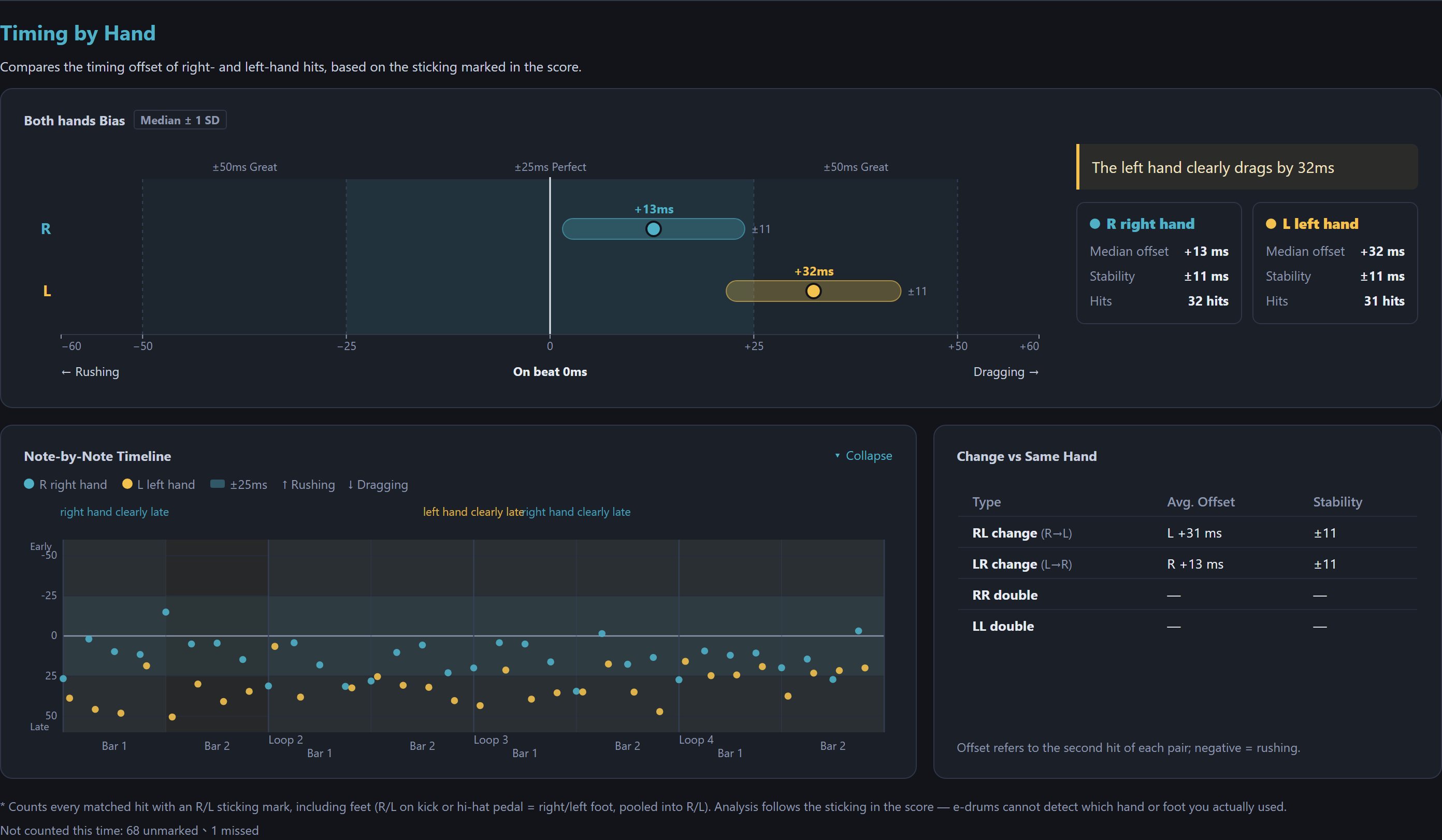
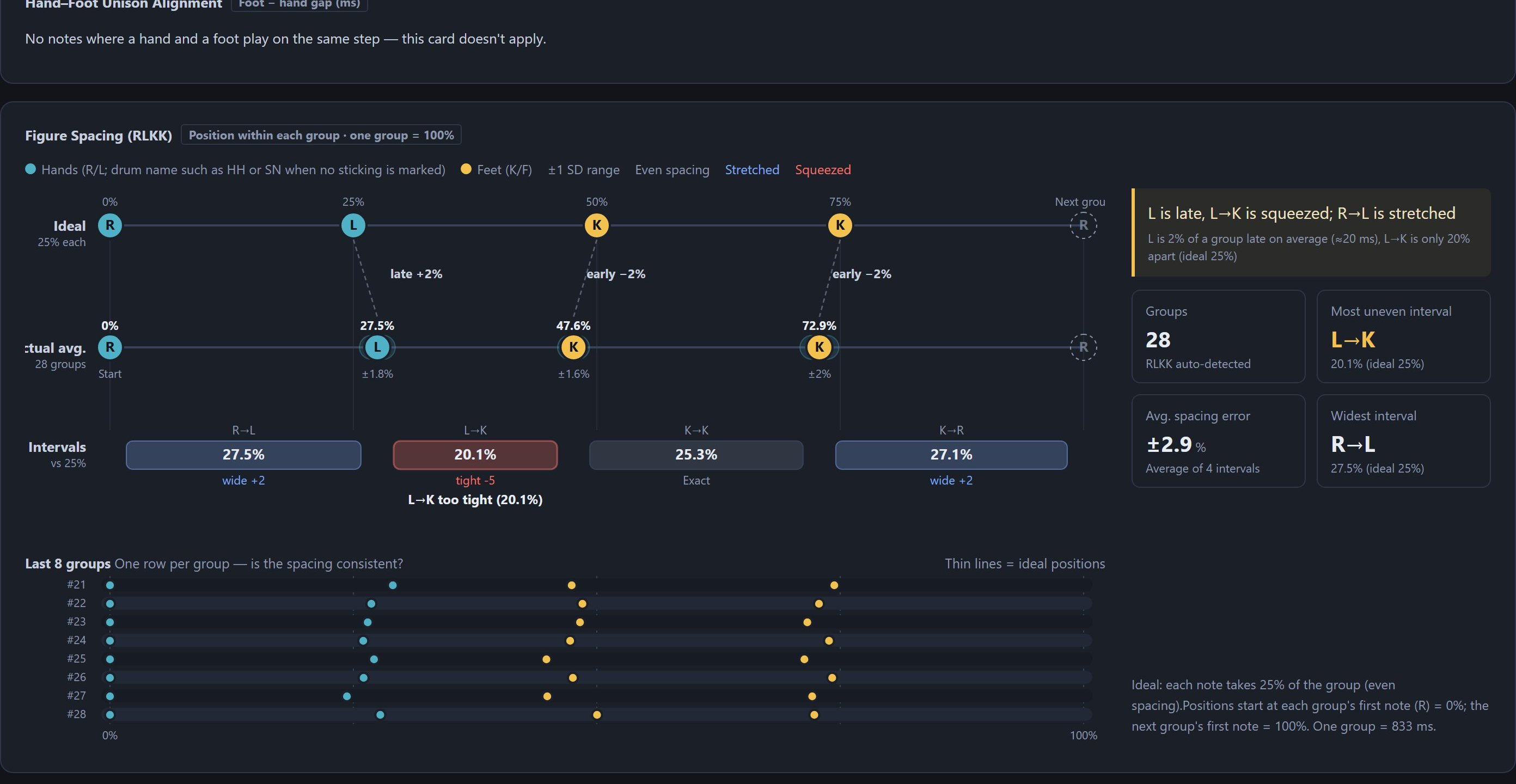
Which beat you rush, which hand drags, where hands and feet don't line up — the score report points it out, so the next lap targets exactly that.

WHO IT'S FOR

Whatever kind of drummer you are, it fits

Practicing, teaching, writing, sharing — one tool, four ways to use it.

Drummers who want to improve

Turn practice into progress you can see

Write down the groove you want to work on and take it from slow to fast with the metronome. Every scored take is saved, so the numbers show exactly how much steadier you are than last week.

  • Write your own, or start from a sample: rock, funk, bossa nova — open one and play
  • The score report pinpoints problems: rushed beats, a dragging hand, hands and feet out of line
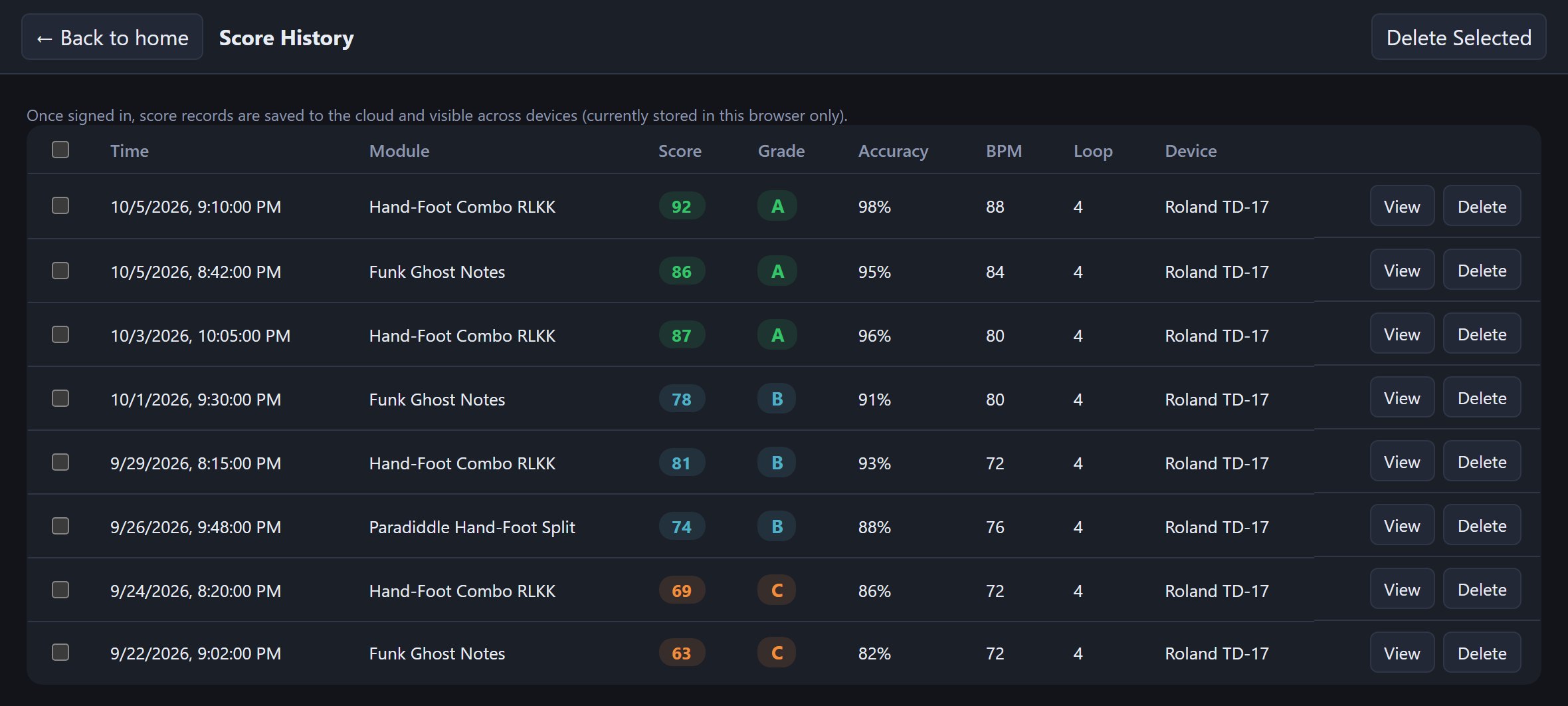
  • Score history: every result is kept, so progress is plain to see
Drum teachers

Organize your lessons, play them anytime, send them in one link

Write out the grooves your students should practice and sort them into groups: warm-ups, rudiments, grooves, fills… Signed in, everything lives in the cloud, ready to play before any lesson. When it's time, turn a whole group into one link and send it out.

  • Groups with icons: lessons sorted by level or topic at a glance
  • No sign-up for students: open the link to listen, practice and save
  • Self-check at home: students switch to Scoring Mode and see how accurate they really are
Arrangers & writers

When an idea hits, get it down right away

Thought of a groove or a fill? A few taps on the grid and it's written down. Signed in, it's saved in the cloud and waiting on any computer or tablet, so nothing gets lost. It's drawn as clean, readable notation as you go, and you can export a PDF for the band.

  • Every detail fits: sticking, accents, ghost notes, grace notes, any time signature
  • Edit and hear it instantly: change one cell and hear it, played back with real recorded drums
  • One link for the band: everyone practices the same groove
Drum creators

Show off your chops, and let everyone take them home to practice

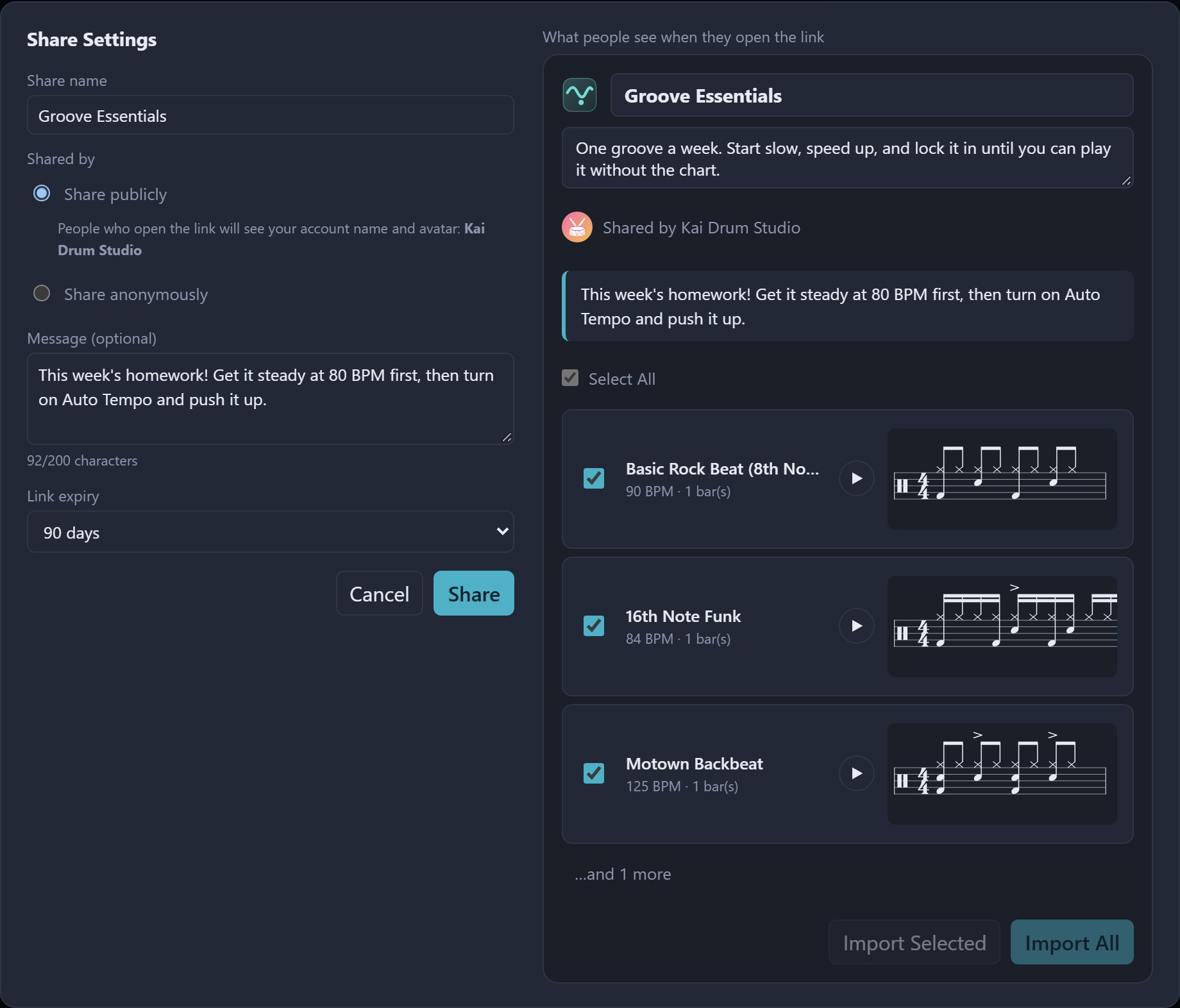
Write out the chops from your latest video, create a public share link, and drop it in your Reels, Shorts or posts. Anyone who opens it sees your name and avatar, and can listen, practice, save it to their own library, and pass it on to more drummers.

  • Your name on your work: public shares show your name and avatar
  • No sign-up for fans: open it to listen, import, and take on the scoring challenge
  • You control the link: set an expiry, and update the same link when you change the content
1PRACTICE

Write it like a chart, practice it like a drummer

One tap on a cell is one note. Mark sticking, accents, ghost notes and grace notes, and the notation is drawn below as you go. Sample grooves — rock, funk, bossa nova, samba and more — are ready to play.

  • Hear the groove: played back with real recorded drums, plus a metronome
  • From slow to fast: the Tempo Trainer speeds up a little every few bars
  • Write any rhythm: 6/8, 7/8, triplets, sextuplets
Editing a groove: sticking, accents, ghost notes and grace notes marked on the grid, with the live score drawn below
Score editing

Tap cells to write the chart, mark every detail

One tap on a cell is one note. Then use the Score Editing panel on the right to add sticking, accents, ghost notes, grace notes, open hi-hat, rim and ride bell — the notation is drawn below in real time.

  • Write any rhythm: a time signature for each bar, and triplets or sextuplets wherever you want
  • Rearrange bars freely: drag to reorder, copy, delete — and undo mistakes
  • Easy-to-read charts: single staff or hands/feet on two voices, with PDF export
Kit settings

Swap sounds, add pieces, build your own kit

Switch the whole kit's sound in one click: Acoustic Kit and Power Rock are real recorded drums, plus Electronic (808) and Retro Lo-Fi. Each piece can also get its own sound and volume.

  • Add the pieces you play: Splash, China and Crash 2 are one checkbox away, or create your own
  • Match your own e-drum kit: if a pad is mapped wrong, hit it once to reassign it (MIDI Learn)
  • Your setup follows you: signed in, your kit settings are the same on every computer and tablet
2SCORING

Every hit counts

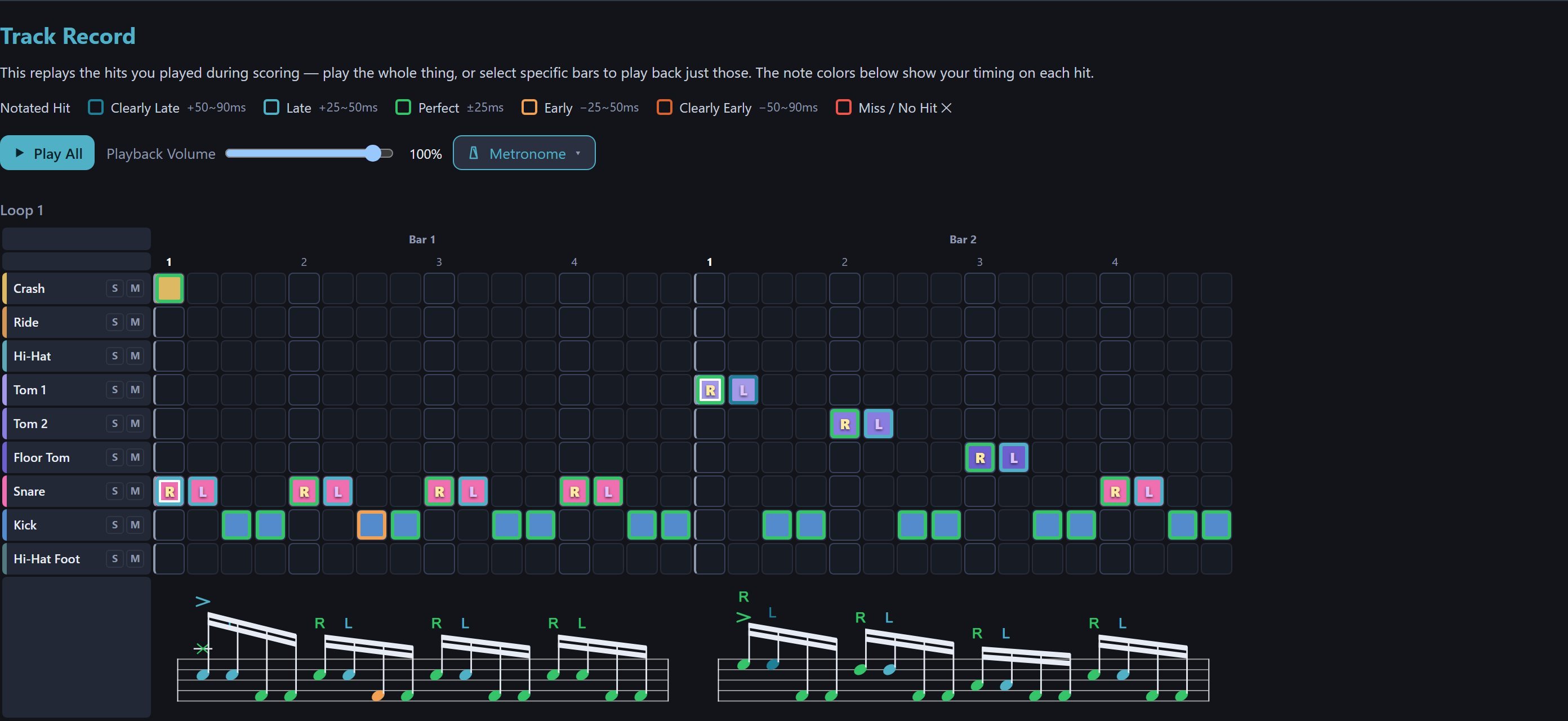
Switch to Scoring Mode and play along. Every stroke is judged on its timing, to the millisecond. You see your score and grade the moment you finish, and every result is saved.

Perfect ±25msGreat ±50msGood ±90msMiss
  • Fair judging: measure your setup's latency in one click and it's compensated automatically
  • Hear only your own drums: the demo drums mute automatically when a real kit is connected
Scoring Mode in progress: live results and the judgement for every hit

Practice your way, get scored when you're ready

After importing a groove from a teacher or a great drummer, you don't have to grind through it at full speed. Set it up the way that works for you, and switch to Scoring Mode once it's solid.

Set your BPM

Slow it down until you can play it steadily, then speed it up. Shared grooves can be set to your own tempo too.

Loop count and count-in

Choose how many times to play through, or loop forever. A count-in before you start lets you come in relaxed.

Tempo TrainerPractice mode

Automatically add (or drop) a few BPM every few bars. Work from slow to fast, find your top speed, then get scored at that tempo.

Bar mute

Silence the metronome on chosen bars to practice keeping time yourself. Scoring still runs, and the report shows whether you sped up.

Dynamic score

Notes light up and a cursor follows along as it plays. To practice like reading a real chart, pick "No dynamic effect".

Hide the grid, read the chart

Collapse the step grid in one click and keep only the notation to practice reading. It can also collapse automatically when you switch to Scoring Mode.

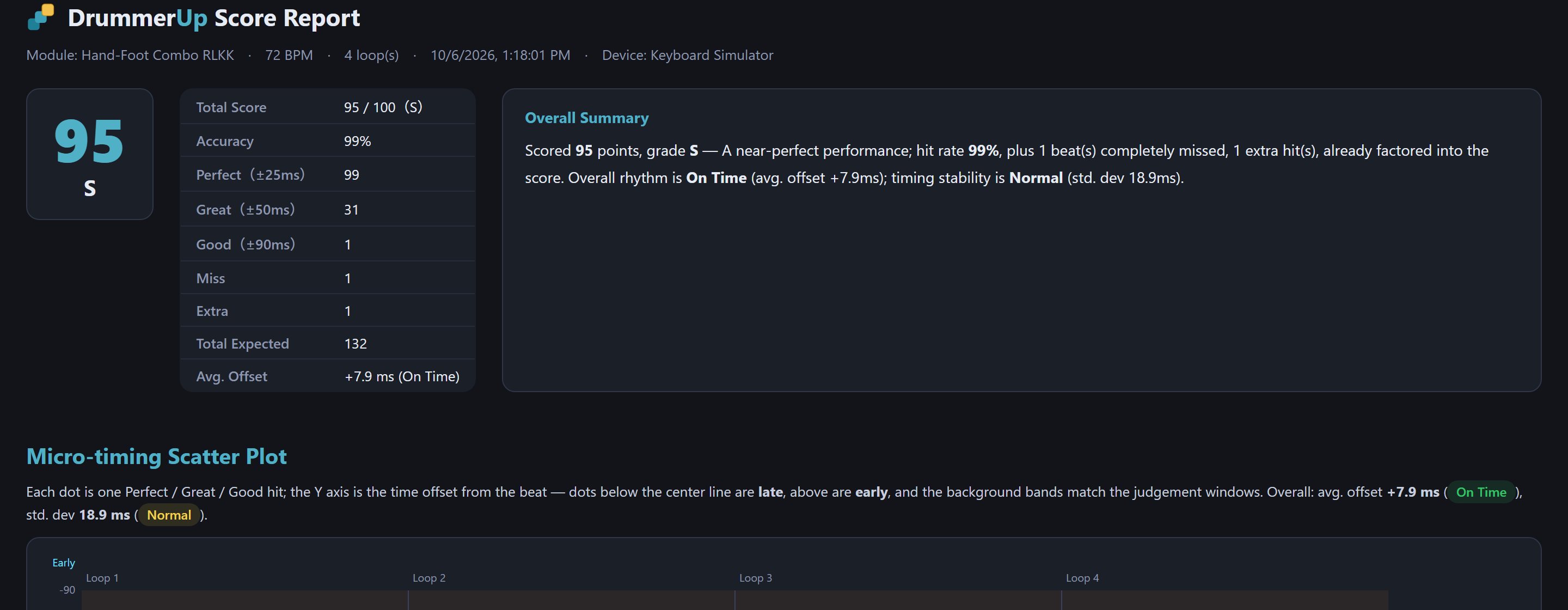
3FIND WHAT'S OFF

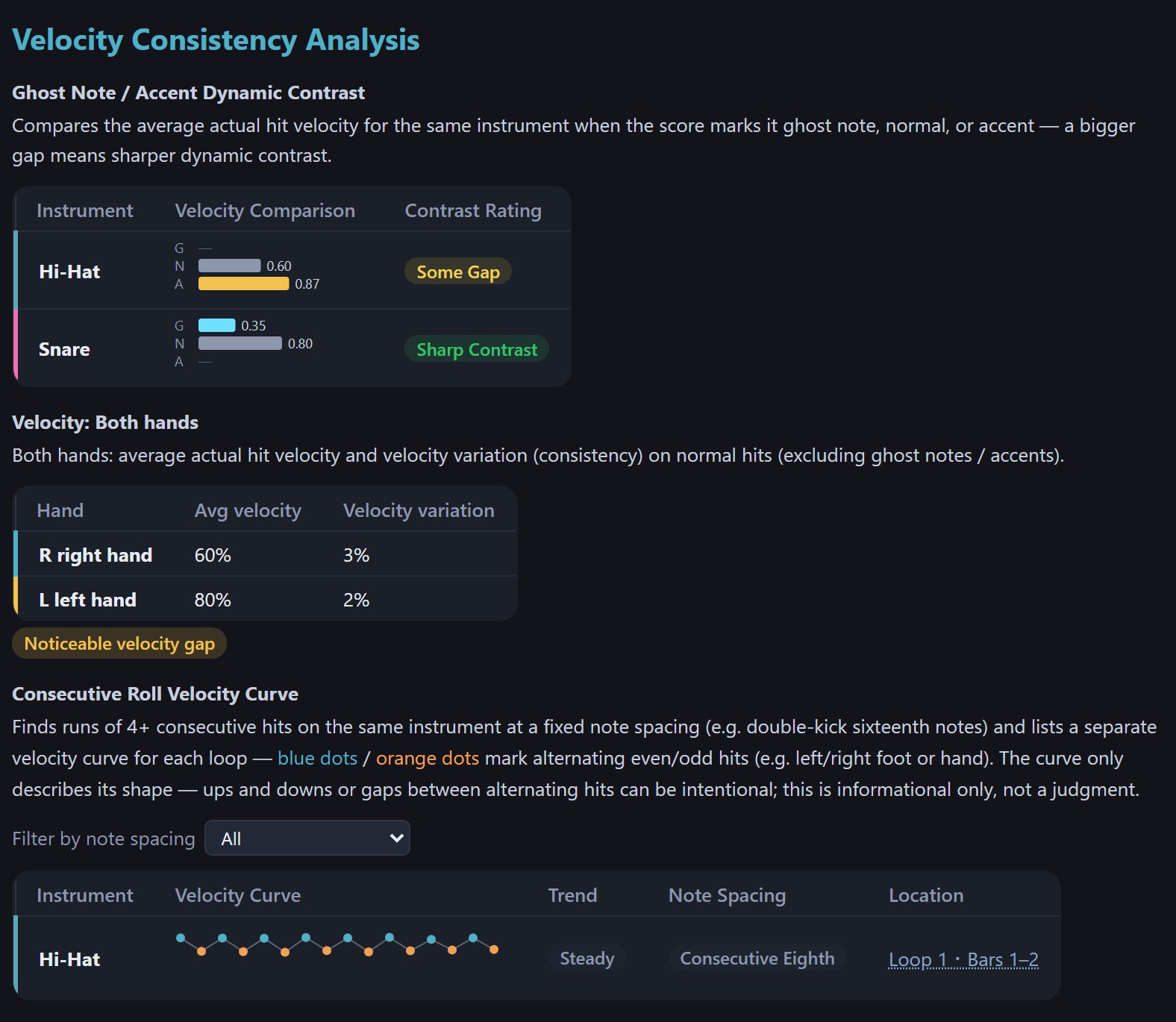
The score is just the start — the report tells you what's next

It turns "something feels a bit off" into problems you can see — and lets you replay every hit you just played.

SHARING

Share your grooves — and take on practice from great drummers

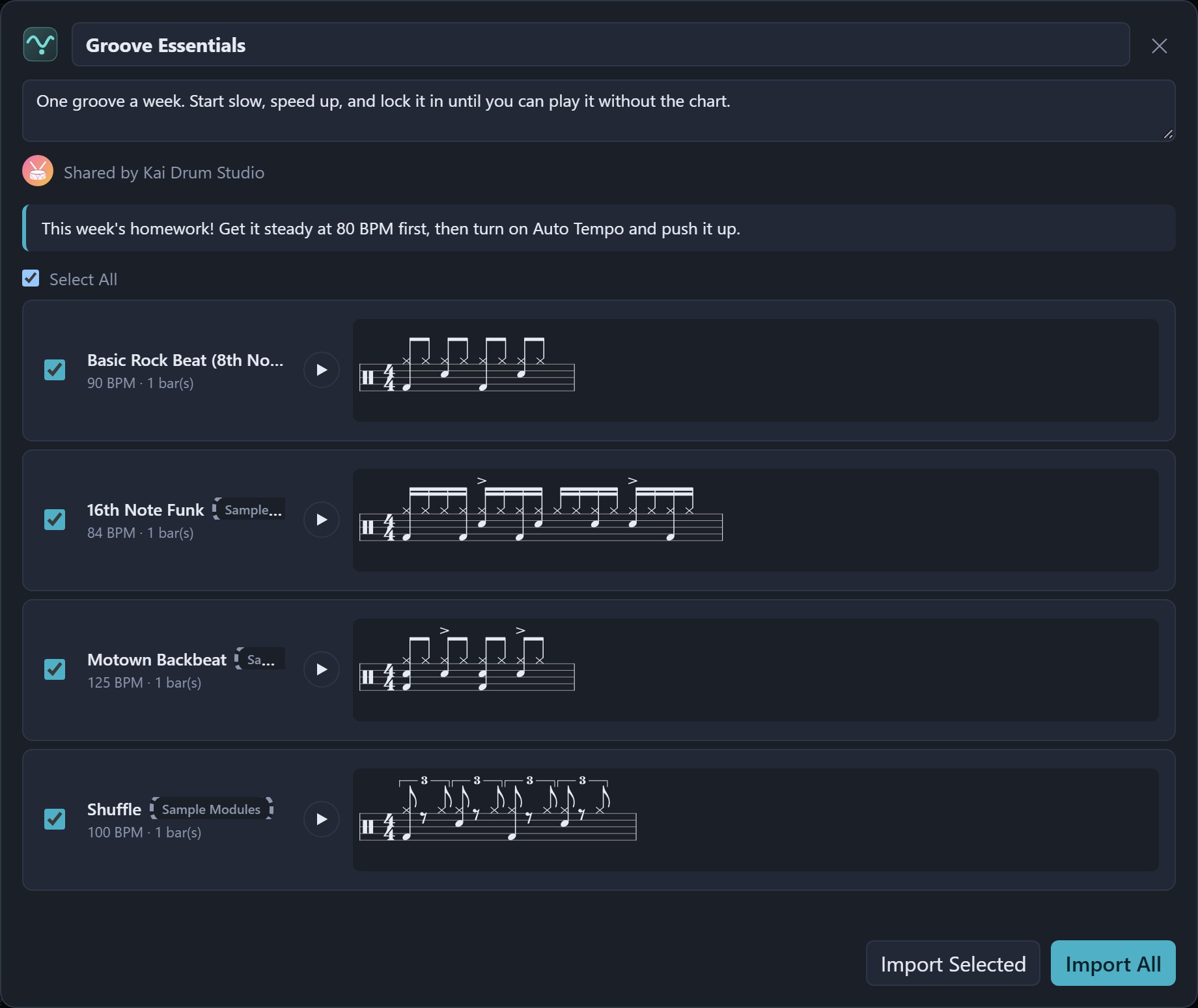
One link sends a single groove or a whole practice set. The other person doesn't need an account — they open it and can listen, practice and get scored. Creating a share link just takes a free sign-in.

GET PLAYING

Plug in your e-drums and play in three steps

USB-MIDI e-drum kits work as soon as they're plugged in, and common brands are detected automatically.

1Plug in USB, click "Allow"Connect your kit with a USB cable. When the browser asks whether the site can use MIDI devices, click Allow — and you're connected.
2Pick up your sticks and playPlay along and every hit shows up on screen instantly. The demo drums mute automatically, so you hear only your own kit.
3See your results right awayScore, grade, which beat you rushed and which hand dragged — the score report spells it all out.
RolandAlesisYamahaEFNOTEOther GM-compatible e-drums

No e-drum kit? Your tablet is the kit

Turn on the touch simulator and the whole kit is on screen: play with several fingers at once, and resize or move pieces to suit your hands. On a computer you can play with the keyboard, with keys you can remap.

Nothing to install — just open itPractice and get scored without signing in.
Sign in for the full experienceCloud storage, sync across devices, and share links.
The touch simulator on an iPad: play the whole kit right on the screen
FAQ

Frequently asked questions

Does it cost anything? Do I need to install it?

It's free, and there's nothing to install — open it in your browser and play. Every practice and scoring feature works without signing in, but we recommend creating a free account: you'll be able to create share links, and your modules, groups and scores are saved to the cloud, so they follow you to any computer or tablet and don't disappear when browser data is cleared.

Which electronic drum kits are supported?

Any USB-MIDI e-drum kit. Roland, Alesis, Yamaha and EFNOTE are detected automatically; other brands use the General MIDI mapping, and any pad that doesn't match can be reassigned with a single hit.

How do I get someone else's practice?

Ask them to share a link from DrummerUp. Open it to listen, then click Import to save it to your module library — no account needed.

Can I share with friends who don't have an account?

Yes. Creating a share link requires signing in; opening, listening and importing don't.

My iPhone or iPad isn't receiving anything from my kit?

No browser on iOS supports Web MIDI. Open this site in MIDIWeb Browser instead, or play on screen with the touch simulator.

Where can I learn how each feature works?

The user guide has illustrated, step-by-step instructions for everything from connecting an e-drum kit and writing grooves to reading the score report. It's currently available in Traditional Chinese only. Questions are welcome at support@drummerup.com.

Start your first lap

Nothing to install — open it and play. We recommend a free account so your modules and scores are saved in the cloud and you can share with friends. Questions or feature requests? Write to support@drummerup.com.

Start practicing now